There's one feature almost every SaaS platform wishes they never have to build. And it's for the same reason it almost never gets the attention it deserves. It's not at all flashy and it's almost never why your metrics bump and your numbers skyrocket.
I'm talking about: Data Export.
Last month I built an export feature for the user research platform I've been working on for the last few years. On paper, it sounds simple: give users their data back. In practice, it forced me to think harder about what the user needs without a bias.
The Product Problem
If 4 years building a user research repository from the ground up has taught me anything, it's how personal the research process is. We'd have teams who had been using our platform to build their research context layers — transcripts from dozens of interviews, raw notes, open ended survey analysis, annotations tied to specific moments in a user interview, taxonomy across multiple projects and what not. Even though we cut research synthesis time for them by 97%, they'd still spent hours, days and weeks over the course of their subscription getting this data on board and making sense of it.
And we built support for all types of data sources. We made it so intuitive for our users to come to our platform and upload any type of user research data. Now that it was time for them to figure out how to take data out of our platform, I wanted to approach this product problem with the same energy I utilised to get users hooked onto our platform and trust us with their research data.
So the question was: how do you structure export data in a way that makes sense to researchers and their engineering teams?
Competitor Analysis: What I Saw 👀
Before writing a single line of product spec, I wanted inspiration and perspective. I went to look at how the category leader in user research tools had solved this.
What I found amazed me — and not in a good way.
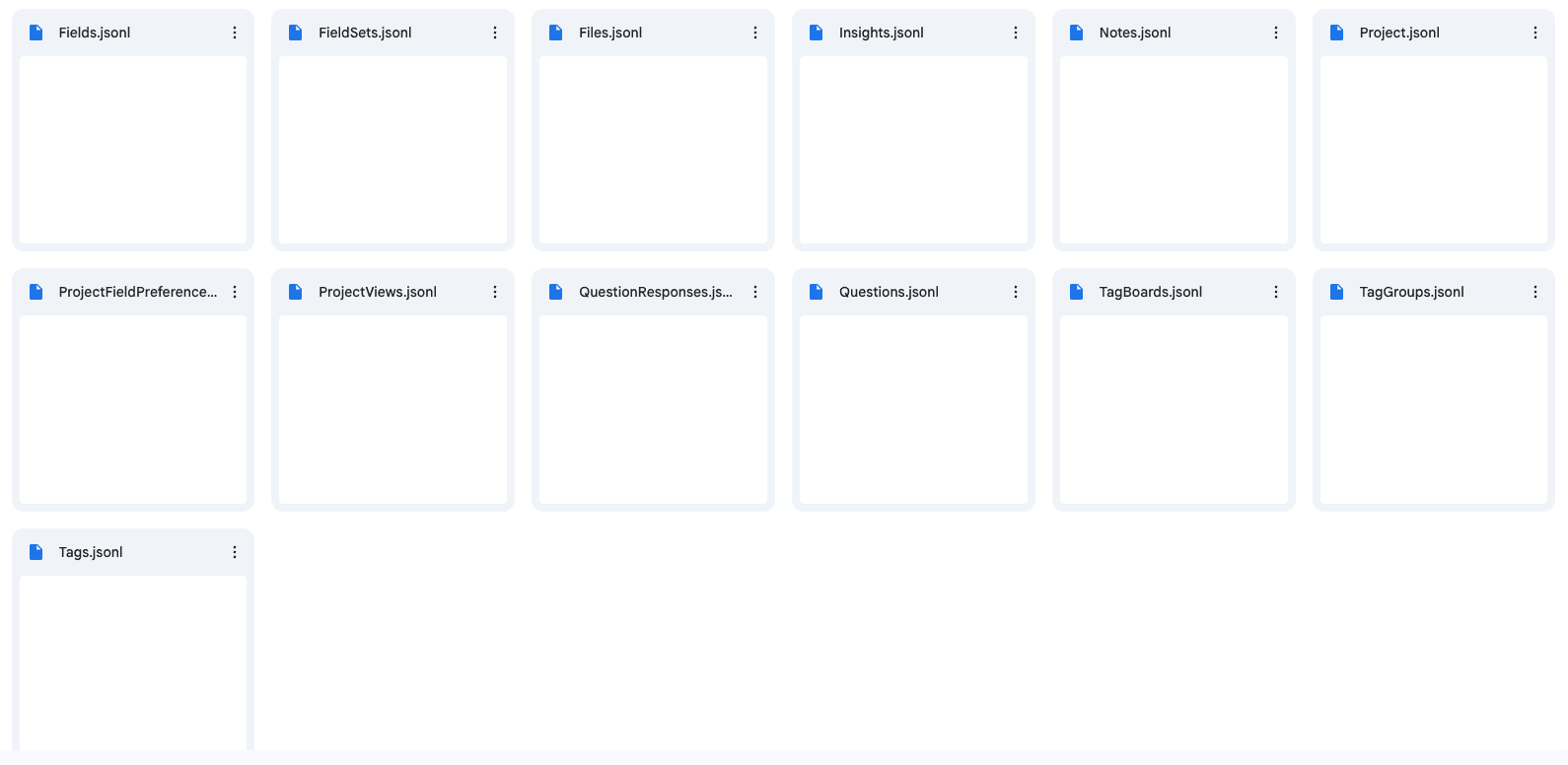
A raw JSON file. A dump of their database without any labels, schema, or documentation explaining what that data was. This export clearly wasn't very useful for users, and even for internal engineering teams it was so unintuitive.
The burden of interpretation had been placed entirely on the user. And it actually made sense when I thought about the bigger picture. Teams and PMs often treat export as an afterthought — an enterprise procurement checkbox, a compliance requirement, something to lock a deal. The feature ships and nobody looks back.
Reframing the Problem
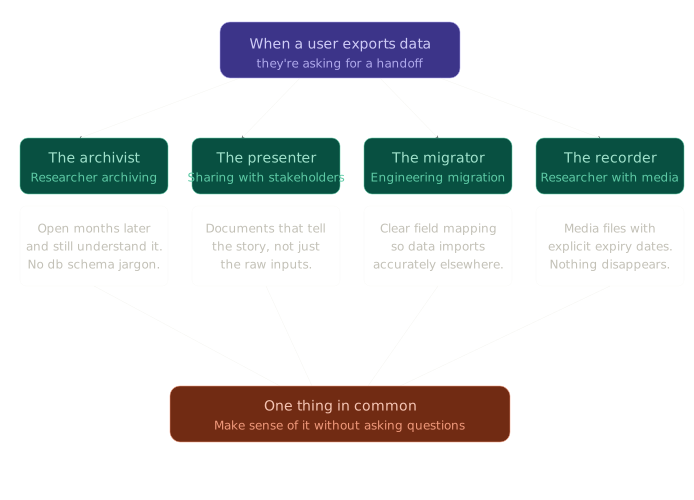
When a user asks for data export, they're asking for a handoff.
My product thinking always starts with: what does a user need here? What are they actually trying to do when they take data out of a platform?
I broke it down into four distinct user scenarios:
-
The researcher who wants to archive a project. They need to be able to open the export months or years later and still understand it. Field names from an internal database schema won't help them.
-
The researcher sharing work with stakeholders. They need documents and reports that tell the story of the research, not just the raw inputs.
-
The engineering team handling a migration. They need a clear mapping between the exported data and what it represents, so they can import it accurately into another system.
-
The researcher who recorded video or audio sessions. They need their media files, and they need to know exactly how long those files are accessible before links expire.
Each of these scenarios has a different definition of "useful." And all of them have one thing in common: the user needs to be able to make sense of what they receive without having to come back and ask questions.
Now that I've reframed the problem, I know the different types of users I'm serving and distinctly what their needs are.
Designing the Solution
My guiding principle: this export should feel like a handoff where the burden of context sits with the person doing the handing off, not the person receiving it.
The Button Has to Be Obvious
Before thinking about what goes inside the export, I had to think about where a user even finds the option to export. The answer couldn't be buried in a settings menu or surfaced only when someone already knew to look.
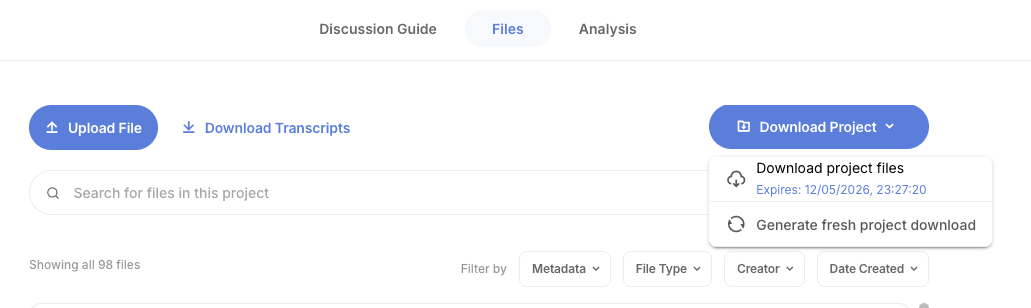
Export is a project-level action, so the CTA lives at the project level — visible on the project page itself, not tucked behind a dropdown. A researcher who has spent weeks building up a project inside the platform should immediately see that this data is theirs to take. The label matters too: "Download Project" is plain enough that it needs no tooltip. A user sees it, understands it, clicks it.

Structure That Mirrors Mental Models
The ZIP structure had to be intuitive. Not organised by database collection or internal system architecture — it should scream how researchers actually think about their work.
So the folder structure became:
my_project_export.zip
├── Project my_project.csv
├── Insights my_project.csv
├── Questions my_project.csv
├── Files my_project.csv
├── Annotations my_project.csv
├── Tags my_project.csv
├── Insights Report my_project.pdf
├── Transcripts/
│   └── participant_1.txt, participant_2.txt ...
├── Notes Files/
│   └── session_notes_1.txt, session_notes_2.txt ...
├── CSVs/
│   └── uploaded_data.csv ...
└── Media/
    ├── Media Downloads my_project.csv
    └── Media Transcripts/
        └── session_1_transcript.txt ...
Open the ZIP and you immediately know where to look. A researcher who has never seen the internals of the platform can navigate it on instinct.
A Data Dictionary, Not a Database Dump
A JSON is hard to interpret for anyone other than an engineer. So every individual export was a self-documenting CSV file.
Every column header is written in plain English, in the language researchers already use — no raw field names pulled from the database. Where a field might be ambiguous, the header includes a description in parentheses so the file itself explains what each column means.
We also added a mapping column for engineering teams. For each field, a note on what it represents in the context of a user research workflow, so anyone importing the data into another system knows exactly what they're working with.
A researcher, a stakeholder, an engineer who never used the platform — anyone could open any export CSV and immediately understand it. No documentation required.
Media That Doesn't Disappear on You ⏳
For sessions with video or audio recordings, we generated signed download links for every file. These links expire after seven days.
We surfaced the expiry date explicitly — in the export itself, and on the button when a user comes back to re-download.
There's nothing more frustrating than clicking a download link that has silently expired. So we made expiry a visible, readable fact rather than a hidden technical constraint.
The Synthesis Travels With the Data
One of the things users build up over time inside a research platform is cross-project synthesis. This was also our moat — we and our customers were proud of how powerful our analysis feature was. The patterns that emerged across multiple studies, the insights that connected disparate sessions — all of that lived in the platform's insights layer.
So we auto-generated an insights report as a PDF and bundled it into the ZIP. The synthesis travels with the raw data. A researcher doesn't have to reconstruct their thinking from scratch after an export.
The Email Fallback 📬
Small details say a lot about how you think about your users.
Generating a full project export — packaging transcripts, media links, CSVs, and a PDF report — takes time. Long enough that a user might leave the page before it's done.
The first step is to tell the user that this might take longer than usually how much they wait to see an output when they click a CTA.
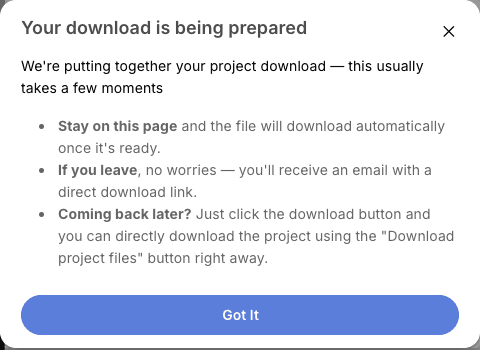
When the export completes, the user gets a notification with their download link, regardless of whether they stayed on the page. We also store the download URL on the project, so if they come back later, the complete state is waiting for them. They don't have to re-trigger the export unless they've changed something in their project and specifically want a fresh package.
The user never has to wonder what happened to their download.

My Takeaways
Building an export feature well is an exercise in perspective-taking. You have to stop thinking about your data model and start thinking about what your user's world looks like on the other side of that download — miles away from your platform.
The gap between a database dump and a thoughtful export isn't an engineering problem. It's a product problem. And it shows up in every file, every folder name, every column header.
Your data should be yours, in a format that serves you.