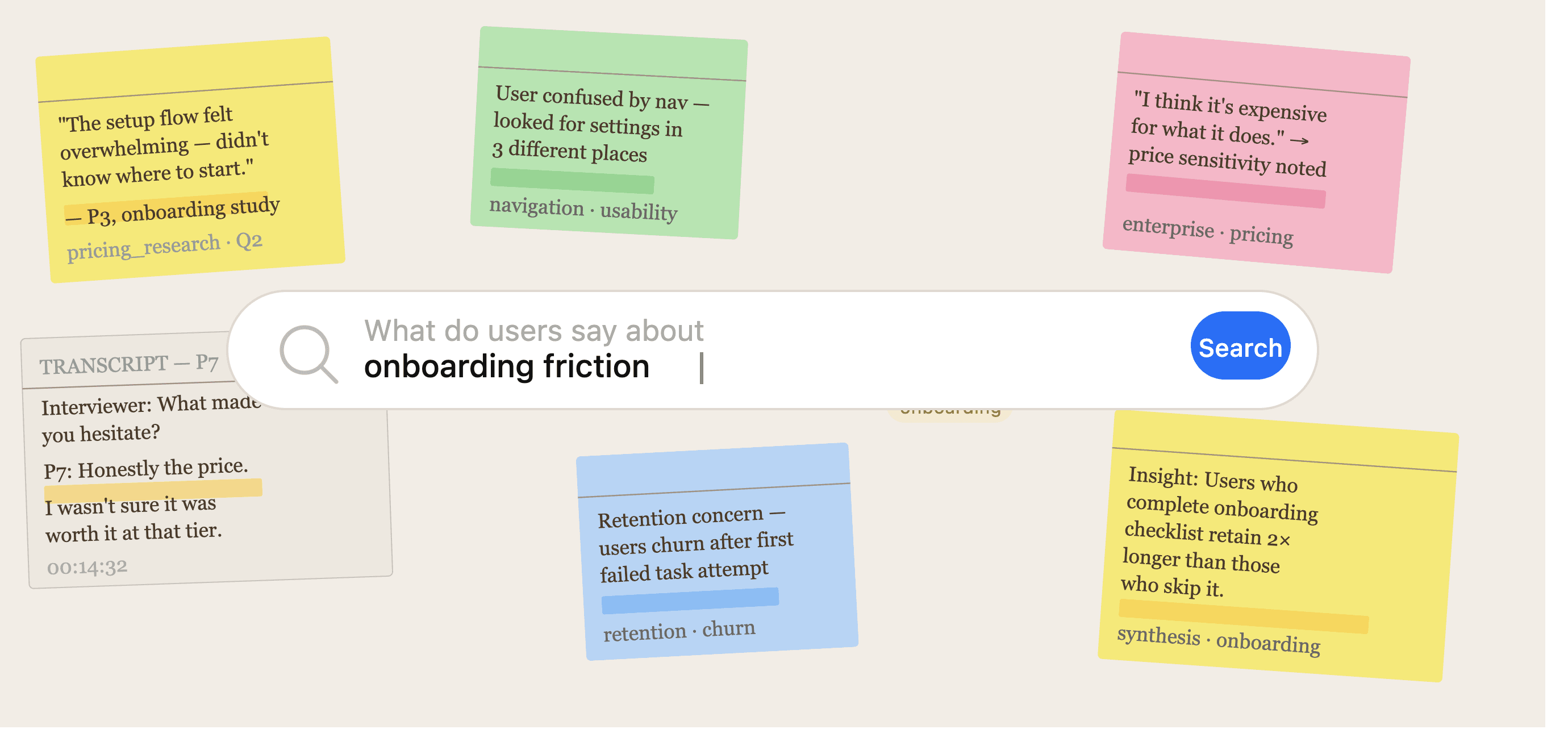
User researchers are spending days and weeks talking to users, extracting meaning from messy data and synthesizing interviews into actionable insights. To get from a question to an answer or an accurate data point, we needed a search on top of the qualitative research repository.
The Problem Space
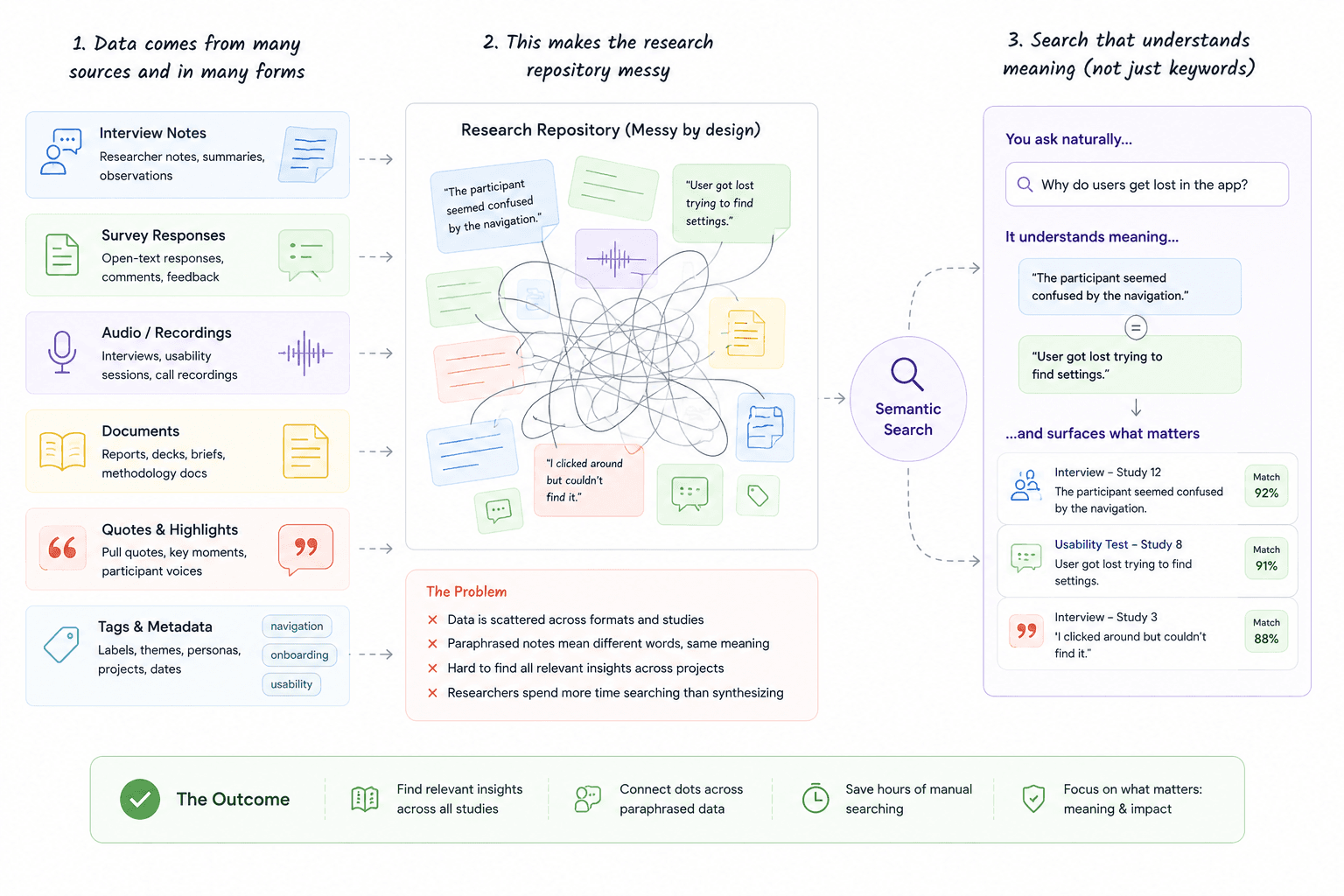
A user research repository is messy by design. You've data from so many sources: raw interview notes, half-formed observations, paraphrased quotes, and synthesised insights that span weeks of research across multiple studies.
Qualitative data is also intentionally paraphrased. A researcher doesn't transcribe verbatim, they note meaning. "The participant seemed confused by the navigation" and "user got lost trying to find settings" describe the same friction but share almost no keywords.
With these problems and a large research repository that stored a humongous amount of research data, researchers struggled with asking questions, finding data or deriving meaning from takeaways across multiple research interview projects.
To solve this problem, we needed search that understood meaning and not just literal search queries. The important distinction here was understanding how researchers think about search. They often query using exact feature names, methodology terms or phrases that a participant said, especially when they have full context about the research studies.
Search in a Nutshell
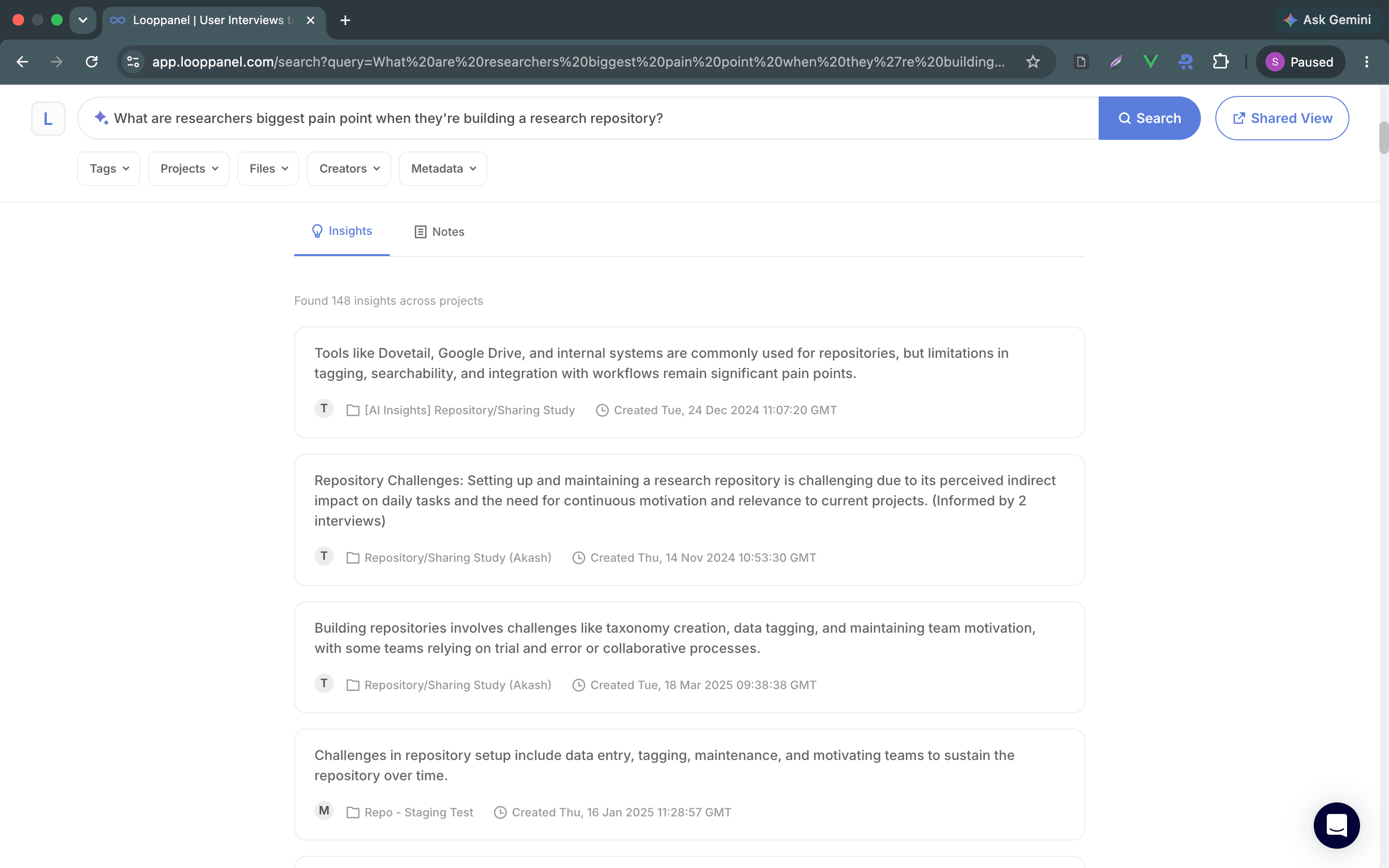
We wanted to build a system that performs keyword matching for precision, semantic understanding for intent, and an AI layer on top that could read across dozens of results and tell you what they actually say.
At the core of a research repository are notes (raw observations from individual calls) and insights (synthesised patterns built on top of notes). Let's say a PM at a SaaS company wants "insights about pricing concerns". Their needs are very different from a researcher who wants every raw note where a user mentioned a price.
Also, a search on top of a research repository is highly contextual. If a researcher asks "what do users say about onboarding?", an exact string match isn't what they're looking for.
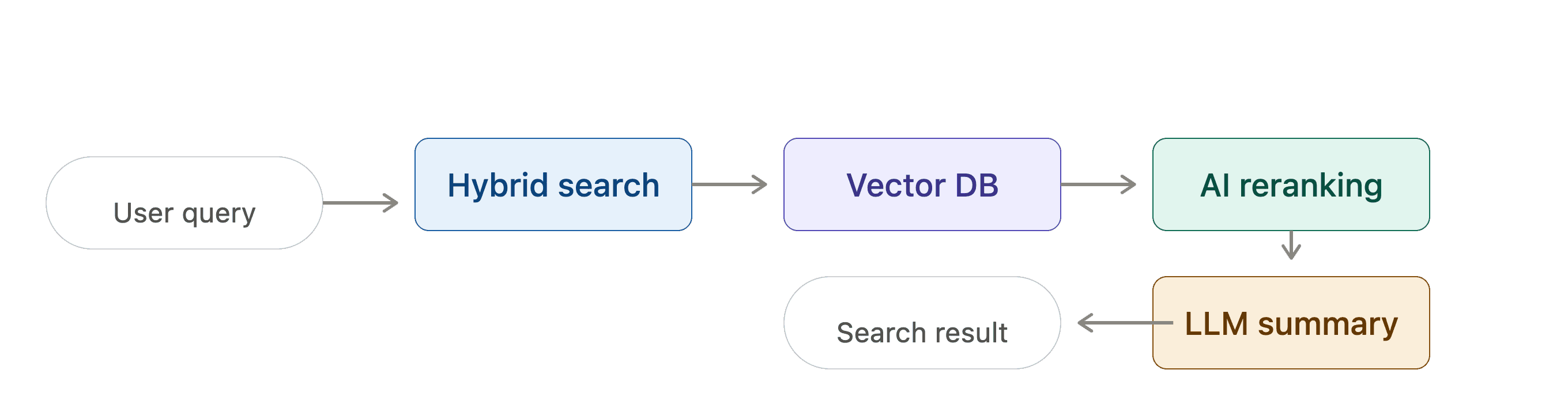
We ended up creating a hybrid search system using a vector database where the notes and insights were pulled from and reranked using an AI relevance layer. Finally, to top it off, each search query also gave back a summary encompassing the search results powered by an LLM.
The Hybrid Search Engine
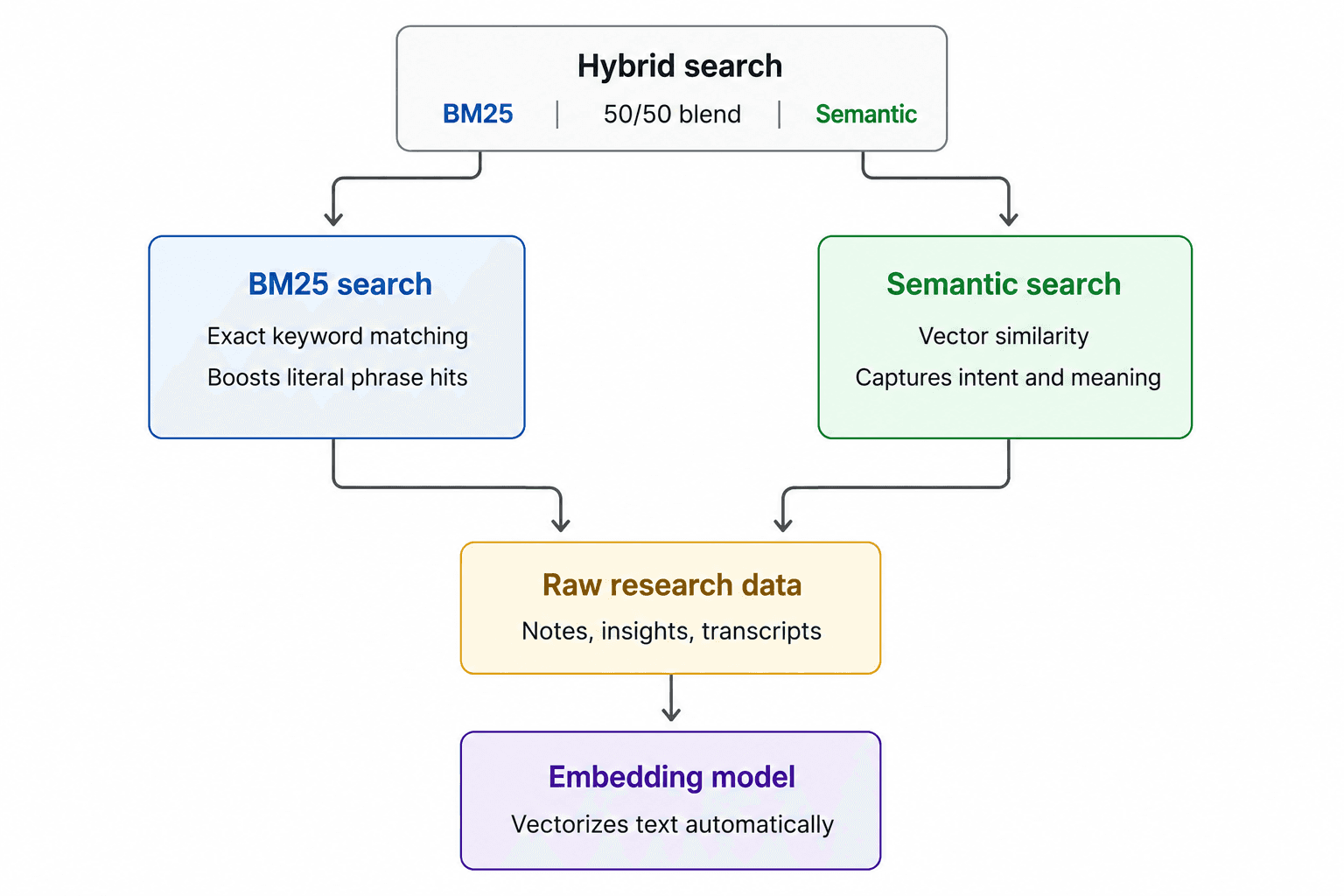
The core search runs on a vector database that lets you combine traditional BM25 keyword search with semantic vector similarity in a single query. It's a 50/50 blend of the two modes.
This isn't a default we accepted without thinking. It was an intentional and deliberate bet on the nature of research data. A set of researchers who have built the repository will often come knocking looking for data that's very close to their literal search query. Another set of researchers who probably don't have a lot of context about the repository will look for answers, and not data.
Why not pure semantic search?
Semantic search excels when the user's intent is vague or the vocabulary between query and document doesn't match. It's great for "what are users struggling with?" But as our usability testing confirmed, researchers also searched with precision. They might search for a specific feature name, an exact phrase a user said, or a methodology term. BM25 handles these cases cleanly.
Why not pure keyword (BM25) search?
We tried this back in 2022 and got no traction. A perfect keyword and fuzzy search built using a robust search provider that searched on top of user's own annotations and notes from their interview recordings.
Traditional keyword search fails in predictable ways. A note that says "the setup flow felt overwhelming" won't surface on a search for "onboarding friction" even though it's relevant.
That 2022 experiment gave us a strong signal to think about search semantically when we were conceptualising it this time.
The 50/50 blend
This was a product decision disguised as a technical one where:
- Exact phrase matches get a BM25 boost without being the only signal
- Conceptual matches from semantic embeddings surface even when keyword overlap is low
- Results that satisfy both modes naturally rank highest
A more research-heavy workspace might benefit from higher semantic weight, while a team that tags everything with consistent terminology might do better with more BM25. I personally find this a super interesting product decision to revisit as usage patterns mature.
The embedding model
The application never generates vectors directly. It sends raw research data as text to our vector database and the vectoriser handles embedding. This keeps the query interface clean and makes it straightforward to swap embedding models at the vector database layer without touching application code.
Two Content Types, One Search
Search happens across two fundamentally different data types:
First data points are the raw notes researchers take during or after interviews. Each note has the researcher's observation and the surrounding transcript context. Both the researcher's observation and the transcript context are vectorised, which means the semantic search can find a note based on what a user actually said in the interview, not just what the researcher wrote as their interpretation. This is important because it means a search for "price sensitivity" can surface a note even if the researcher wrote "user pushed back on cost" because the raw transcript contains the user saying "I think it's expensive for what it does."
The second data source was synthesised findings. These are higher-level, researcher-generated patterns, either manually derived and stored in the repository by the user or auto generated by our AI powered analysis (more on this later). These findings are essentially text and completely vectorised.
Filters: More Nuanced Than They Look
When you're querying data across multiple projects, you run into caveats related to data organisation. Researchers organise their work across multiple dimensions. First, there are projects: Each research interview belongs to a project. For example, a research study on "pricing" can be a project. It can then have many research interviews, say "enterprise pricing", "self serve pricing", etc. Then, there are tags that researchers would have annotated their research notes or transcript with. Research notes could also be organised under a specific interview question, because each project allowed researchers to create a set of question scripts or discussion guides ahead of time to facilitate the research interview and ensure the right data points are collected. Lastly, there's metadata: industry, company size, user persona, etc. Now you can visualise why at its core a research repository can look messy by design because it 100% is messy by nature.
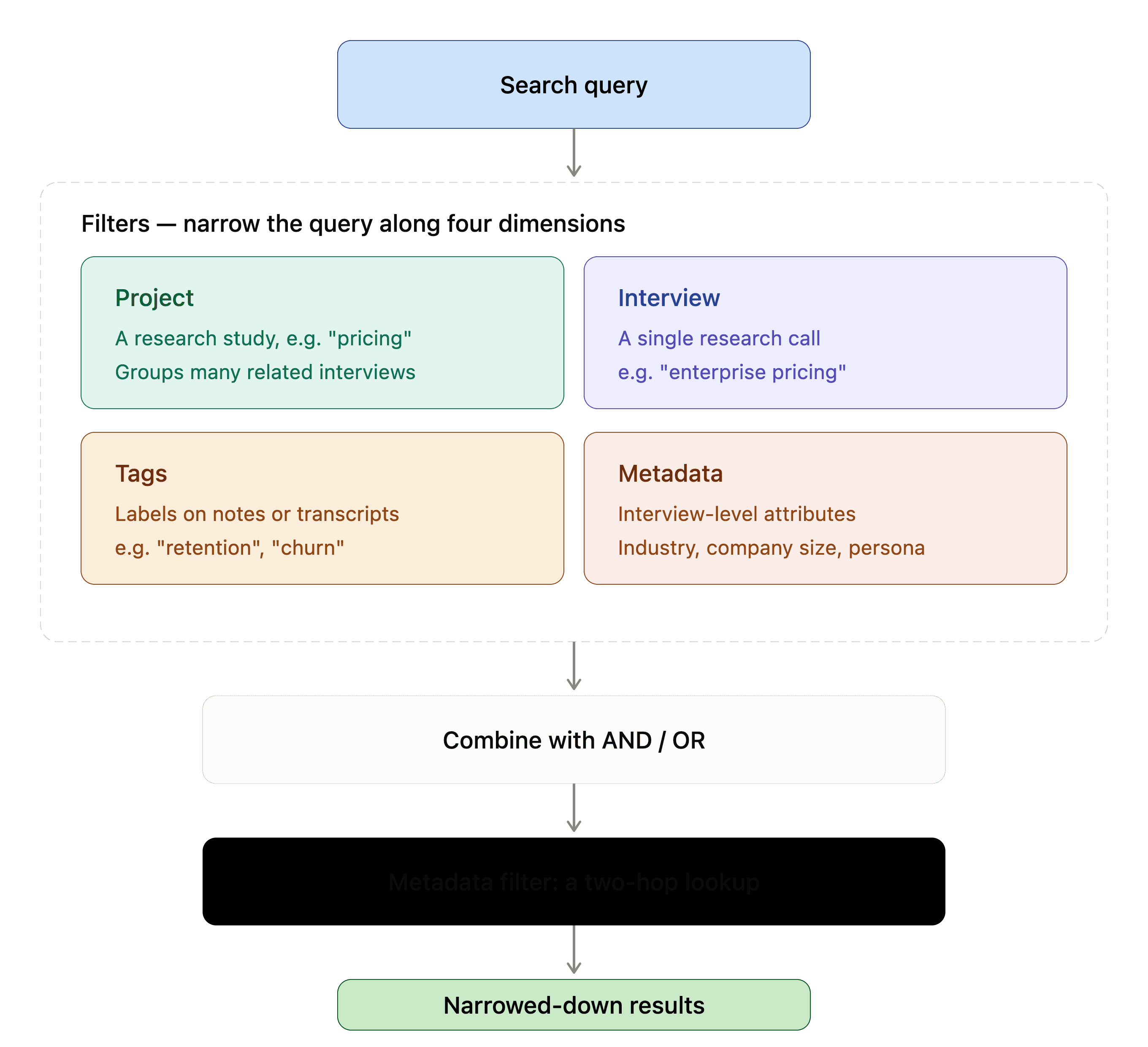
The filter system is one of the more thoughtful parts of the architecture and in my opinion also extremely underrated. It allowed researchers to narrow down their search query by:
- Research project
- Actual research interview
- Tags annotated on top of research notes or transcript
- Project level metadata
With the ability to combine these filters in an OR or AND fashion, it was a very powerful way to narrow down a search query.
It gives researchers real expressiveness. "Show me notes tagged retention OR churn, from project X AND project Y" is a different query from "notes tagged retention AND churn, from any project." The filter schema can represent both.
The metadata filter is architecturally interesting
Research calls often have custom metadata attached, participant segment, company size, role, geography. Rather than storing metadata in our vector database, which would require re-indexing when metadata changes and it often did, the system does a preliminary database lookup. It finds all research interviews whose metadata matches the filter criteria, then uses their identifiers to filter for those interviews in the vector database. It's a two-hop approach, but it means metadata stays in the database where it belongs and doesn't need to be kept in sync with the vector database.
Reranking
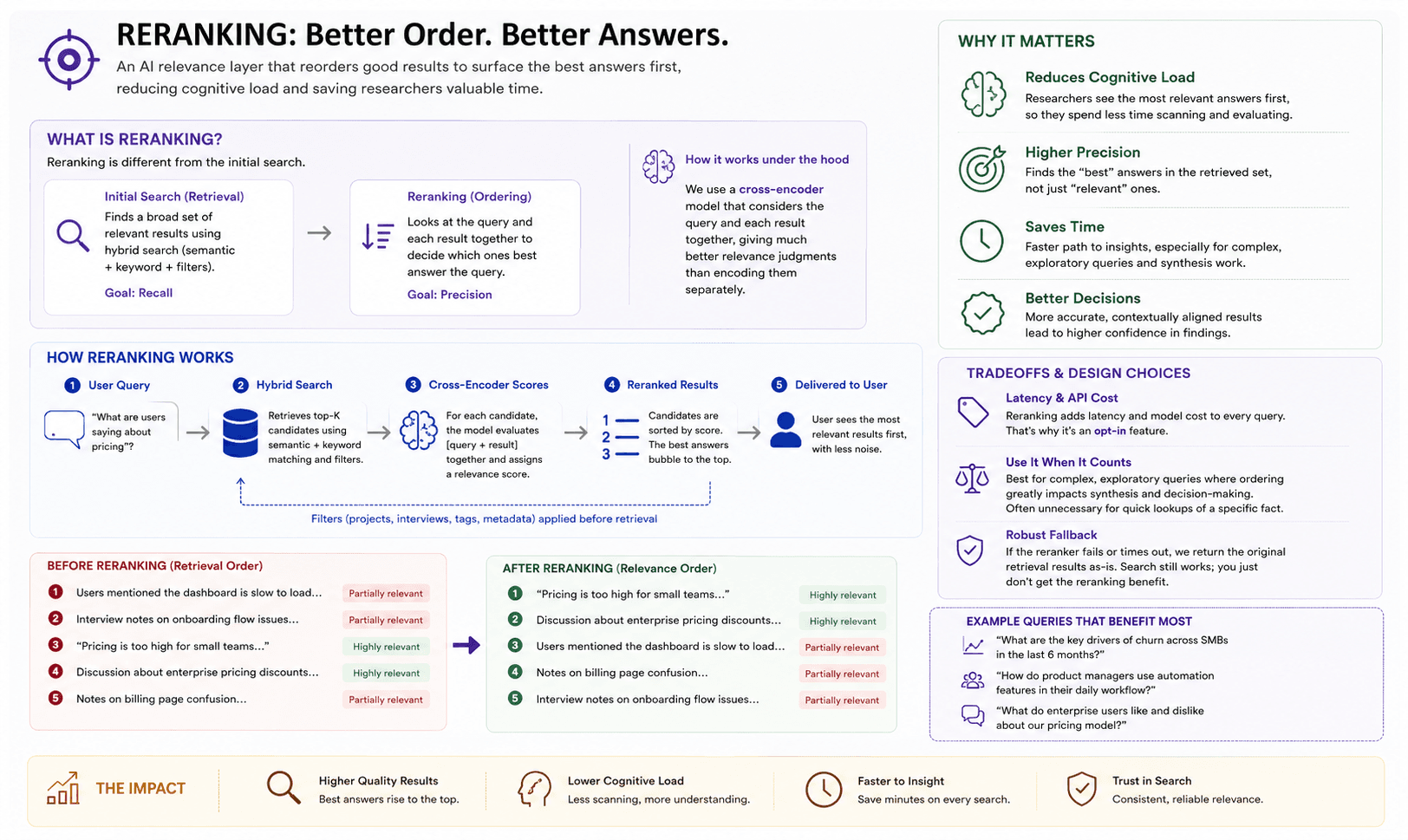
This was a technical masterstroke behind our search. An AI relevance layer that reranked search results to reduce cognitive load on the researchers when they're going through the search results.
Reranking is a different operation from the initial search. The initial hybrid search is about retrieval, finding data that's relevant. Reranking is about ordering, in this set of data, which one best answers this specific query. We used a cross-encoder model that looks at the query and each result together, rather than separately, which gives it much better precision on relevance judgements.
The practical tradeoff was of course latency and API cost to every query where it's enabled. It's an opt-in feature for good reason, many searches don't need it, and the hybrid search is already reasonably good. For complex, exploratory queries where result ordering matters a lot (like building a synthesis), the quality improvement is worth the cost. For a quick lookup of a specific fact, it's probably unnecessary.
The fallback behaviour is sensible: if our relevance later returns an error, the original results are returned as-is. Search still works; it just doesn't get the reranking benefit.
The AI Summary: Where Search Becomes Analysis
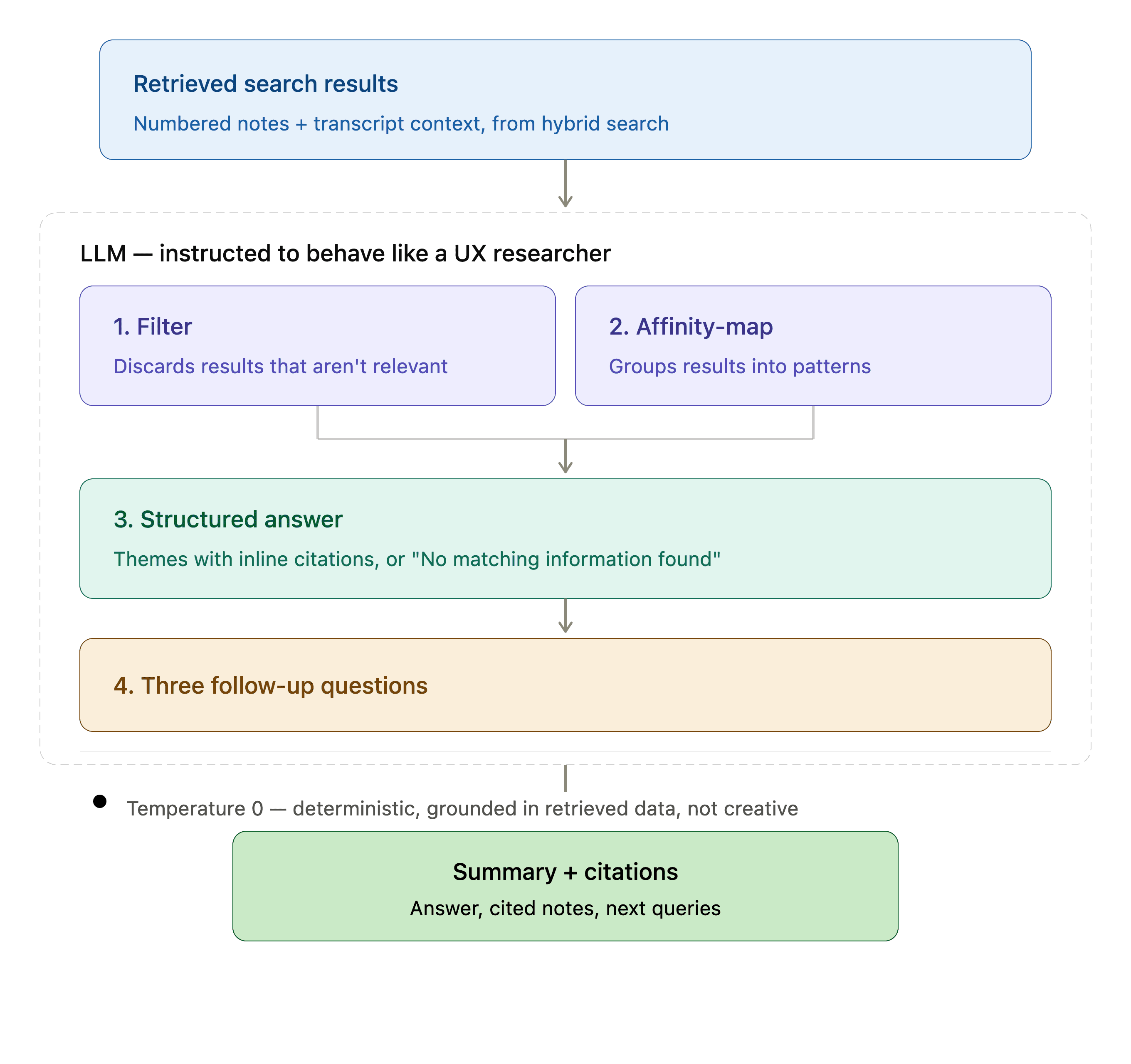
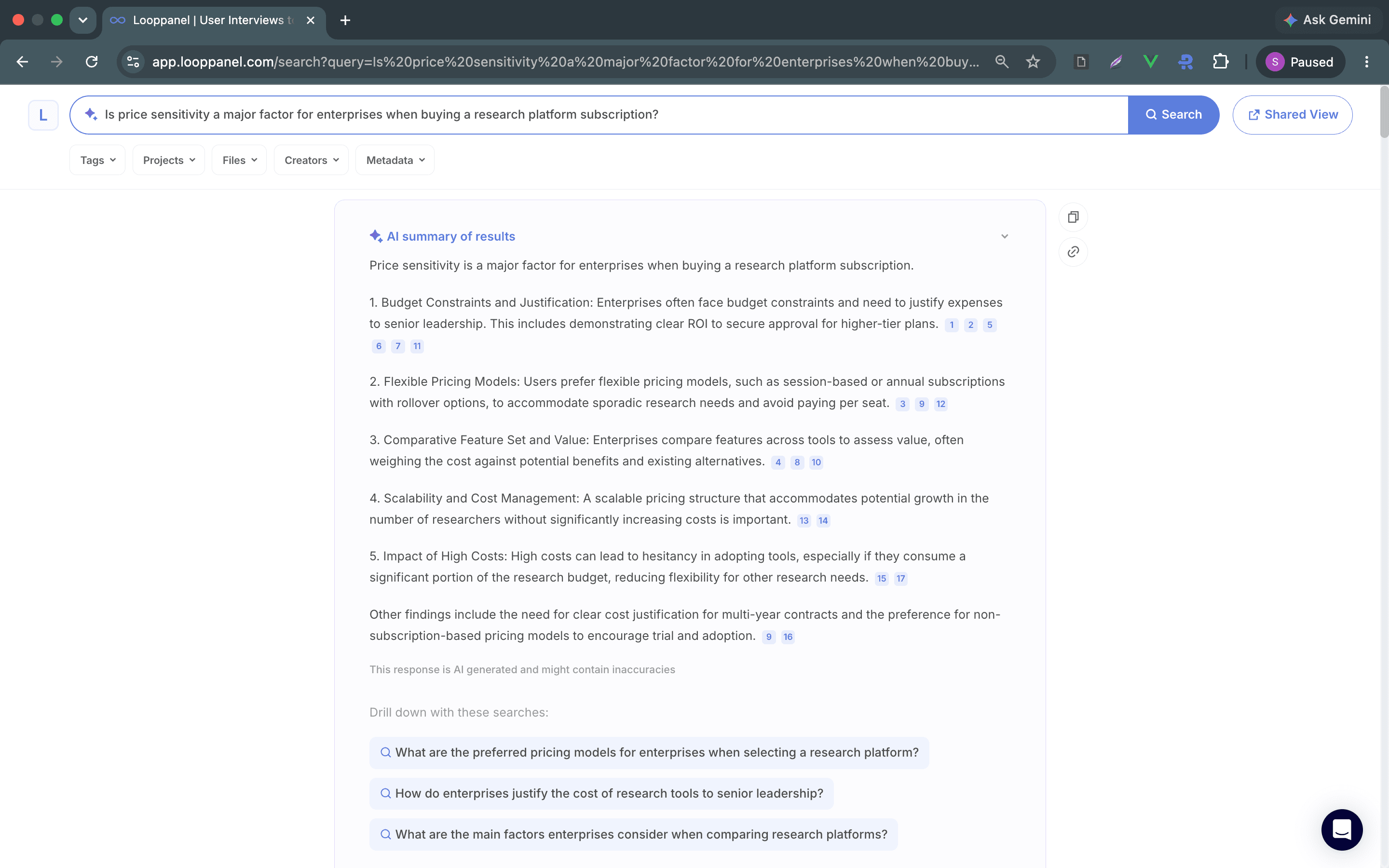
The entire search feature feels so powerful because it's more than just retrieval. It synthesises all the search results into an answer, with inline citations back to specific notes, and generates follow-up questions to guide further investigation. At a glance, you understand what the search results are about, and also get guided on what to search next and how to narrow down your findings.
The AI summary on search was carefully designed around the research use case. An LLM receives a numbered list of search results, each with the note text and transcript context. It's instructed to filter first (not all retrieved results may be truly relevant), then affinity-map patterns, then produce a structured answer with themes and citations. At the end, it provides three follow-up questions to help researchers drill down.
This isn't just "summarise these documents." The instructions explicitly ask LLM to behave like a UX researcher and identify patterns, not just restate content, and to be honest about when the data doesn't support a conclusion ("No matching information found" when the results don't address the query).
Temperature at 0 was a deliberate product choice here. Research synthesis needs to be deterministic and grounded in the actual data. A temperature of 0 means LLM is always picking the most likely token and not the creative variation or hallucination-adjacent embellishment. This comes at the cost of some fluency, but for a tool researchers will use to make product decisions, consistency and accuracy matter more than prose quality.
Multilingual Support: A Feature Flag Done Right
This problem statement deserved a piece of its own, and here it is. But in a nutshell, we later added a feature flag, which when enabled, a language instruction is prepended to the LLM prompt telling it to respond in a different language, the language the user asks their query in, while preserving source notes in their original language.
This is a thoughtful scoping of the feature. The raw notes stay as-is (a note written in English stays in English), but the AI-generated synthesis responds in the researcher's language. It acknowledges that research teams may work in one language while their participants speak another.
Where This Search Could Go From Here
Search was one of the longest running features for our enterprise research platform. We didn't get to iterate on it beyond this, but as a Product Manager who thinks in the long term product vision, my next iteration would have definitely been around user control over the hybrid engine's blend. Different research styles benefit from different search modes. A research repository that tags obsessively benefits from more BM25 weight; whereas the one with more sparse tagging needs more semantic lift.
Closing Thoughts
When we built search as a system, it did genuinely interesting things: hybrid search with semantic embeddings, AI-powered synthesis with inline citations, a two-hop metadata filter, multilingual support, and AI powered reranking. For a qualitative research repository, each of these addresses a real limitation of naive search in this domain.
The most product-interesting decision in the whole system is the AI summary itself. Turning a search result list into a structured analysis with citations and follow-up questions changes the job the product does. It's not just a search engine anymore, it feels like a research assistant that reads your notes and tells you what it found. That's a meaningfully different product proposition.
The interesting questions going forward are more product than engineering: What should the alpha be? When should caching kick in? Should report search mode go GA? How do you build trust with researchers who are rightly sceptical of AI synthesis?
Those are good questions to have. I probably would have asked them the next time I'd to iterate on this product feature or problem.
This post reflects the system at the time of writing. Architecture details, model versions, and feature availability may evolve.