A complete BTS of an AI chat interface for qualitative research data that we built on a hunch and turned out to be one of the most-loved features I've ever crafted.
We spent just two weeks building an AI Chat for qualitative research data. User researchers can directly chat with their data, ask questions and follow-ups. This was right around the time tools like Claude and ChatGPT started marking a shift in terms of how users were interacting with their data.
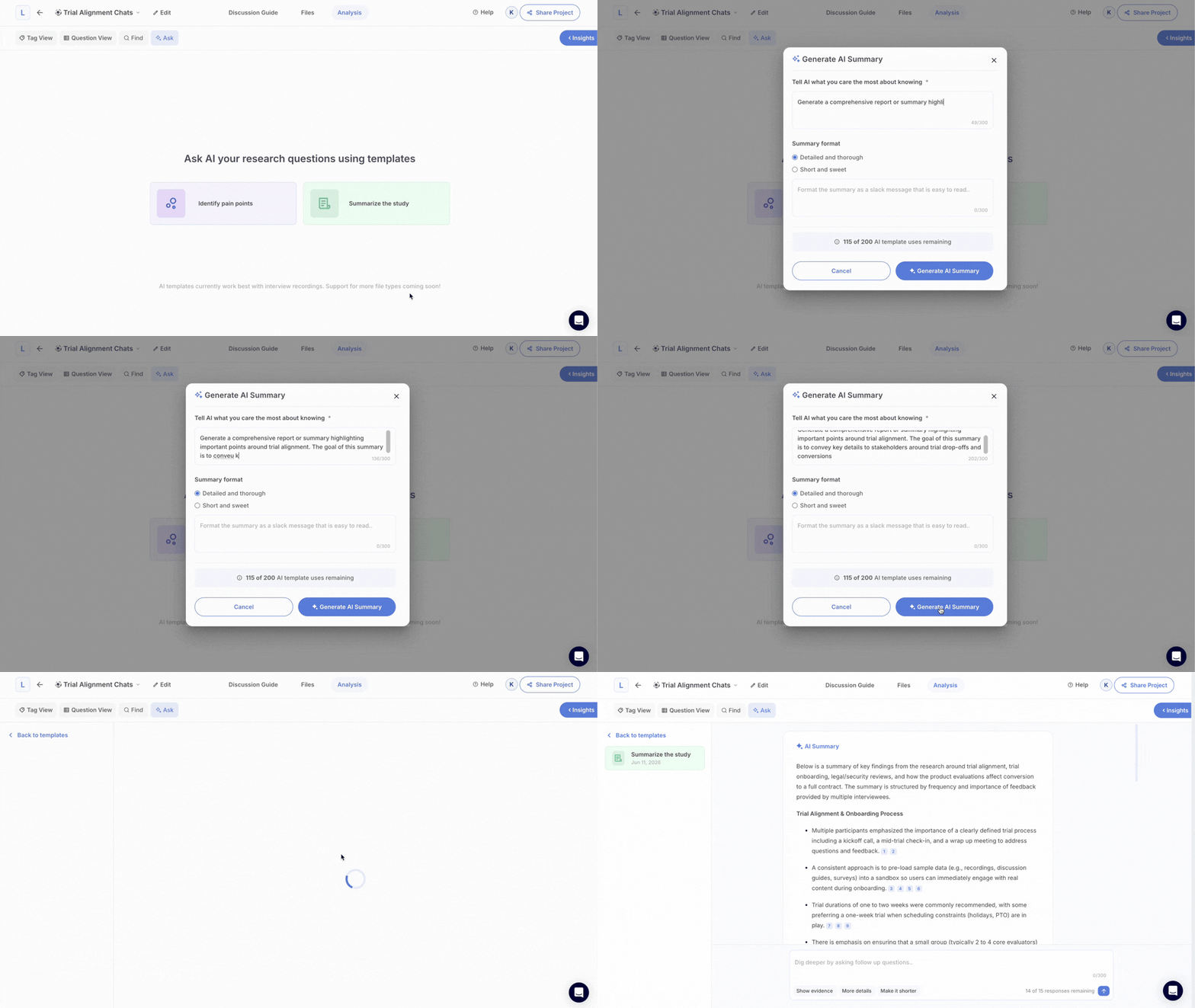
I vividly remember when our CEO used to demo this to a potential customer, the room would go quiet for a second. The kind of quiet that makes people's eyes pop out and their jaws drop.

The most exciting aspect of this feature was taking it from idea to validation testing to production in under two weeks. The overwhelmingly positive response we got from our customers despite its scrappy first few versions topped it all.
This is the story of how and why we built it. If you're a PM thinking about AI features in your own product or an engineer who's wrestled with LLM context windows and citations, I think you'll find something useful here.
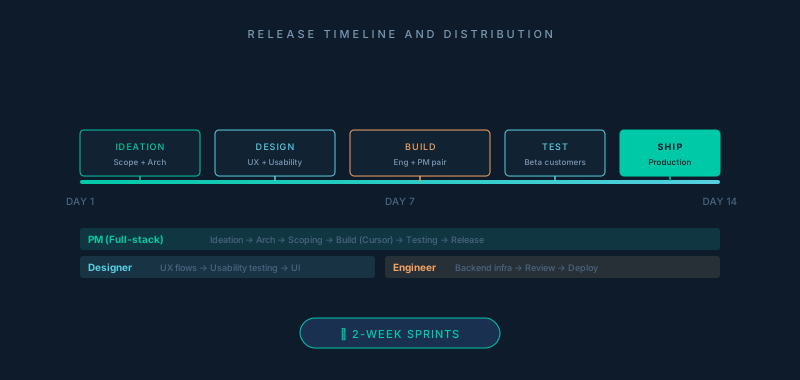
Each release was carried out in 2 weeks. As a full-stack PM, I led this release from ideation to usability testing to scoping the engineering architecture and actually building this out using Cursor. I was accompanied by our product designer, and another engineer.
The Moment That Made Us Move
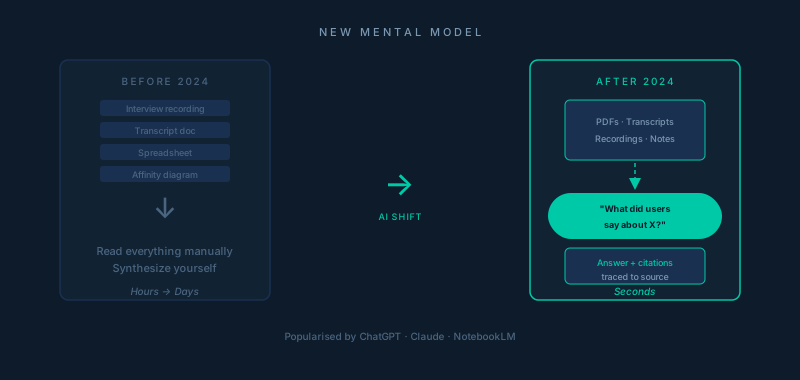
2024 saw a drastic shift in how users stored and interacted with their data. AI-first interaction was becoming table stakes for products that synthesized data. But this new trend swept us off our feet, because you can't prepare for something like this in advance and put it in your long term roadmap.
Consumer first tools like ChatGPT, Claude and NotebookLM had popularized the idea that you could drop a PDF into a conversation and just "Sherlock Holmes" with it. Users were starting to arrive at data driven product decisions with a new mental model: "I should just be able to ask it things".
Context
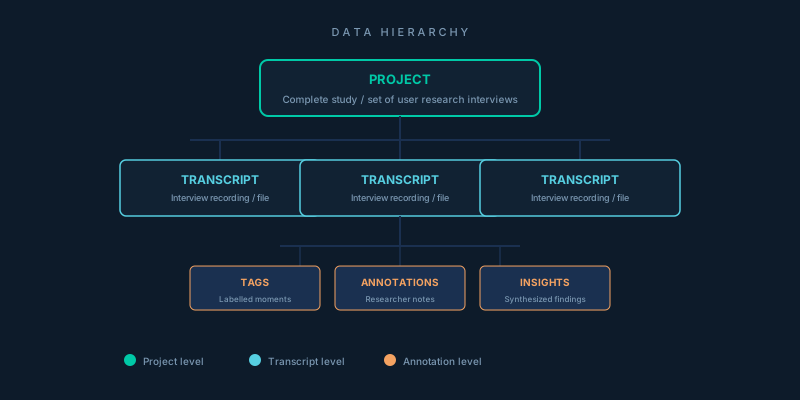
Before I dive in, a little context about our user research platform. A common source of data on our platform was transcripts we generated from user research interview recordings (audio/video files). The data hierarchy was like this:
- Project — Complete study or a set of user research interviews
- Transcript data — Specific user research interview inside that study
- Tags, annotations, insights — Related to a user research interview
A common use case amongst researchers was someone from their team who probably had no context about these interviews, wanting to get answers off the research conducted by their fellow teammates.
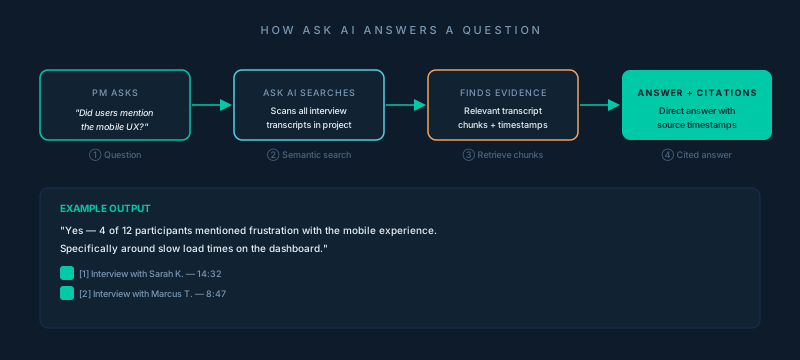
For instance, say a researcher ran 12 interviews on customer churn for their project management tool. Three weeks later, a new PM joins the team. Before their first stakeholder meeting, they want to know: "Did users mention anything about the unresponsive mobile experience?"
Our Ask AI would take this question, look through all the interview recordings and pull out an answer alongside citations to tell the PM exactly what they needed to know and its source of truth before they talk to their stakeholder.
The Constraint That Shaped Everything
We didn't have direct data telling us that users wanted to chat with their transcripts. We had an intuition and a market trend. As a PM, you're not just building everything your customers tell you to build — you're also weighing trends, assumptions, and innovating alongside technology developments.
Our biggest constraint was weighing speed, reliability, and usability to scope a version that we could design, architect, usability test, and release to production within two weeks. The engineering risk was high enough that we couldn't justify building it the "right" way.
What's the "right" way?
Building a chat interface may look easy in theory but it has too many moving pieces — real-time streaming, infinite history, multi-model support, vector store, session management, etc. For a 3-person product + engineering team, this would have taken at least a month.
So we made a deliberate call: build the smallest version that could prove the hypothesis. That meant accepting real limitations upfront and naming them, rather than pretending they weren't there.
What the Beta Looked Like (V1)
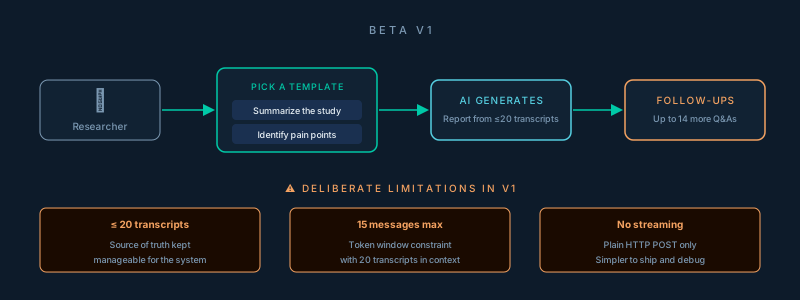
For the beta, we limited AI Chat to projects that have fewer than 20 transcripts. We wanted the source of truth to be manageable by our system. We had ~10 enterprise customers we knew would be willing to try this on some of their recent projects and they told us none of these projects had more than 10–15 interviews.
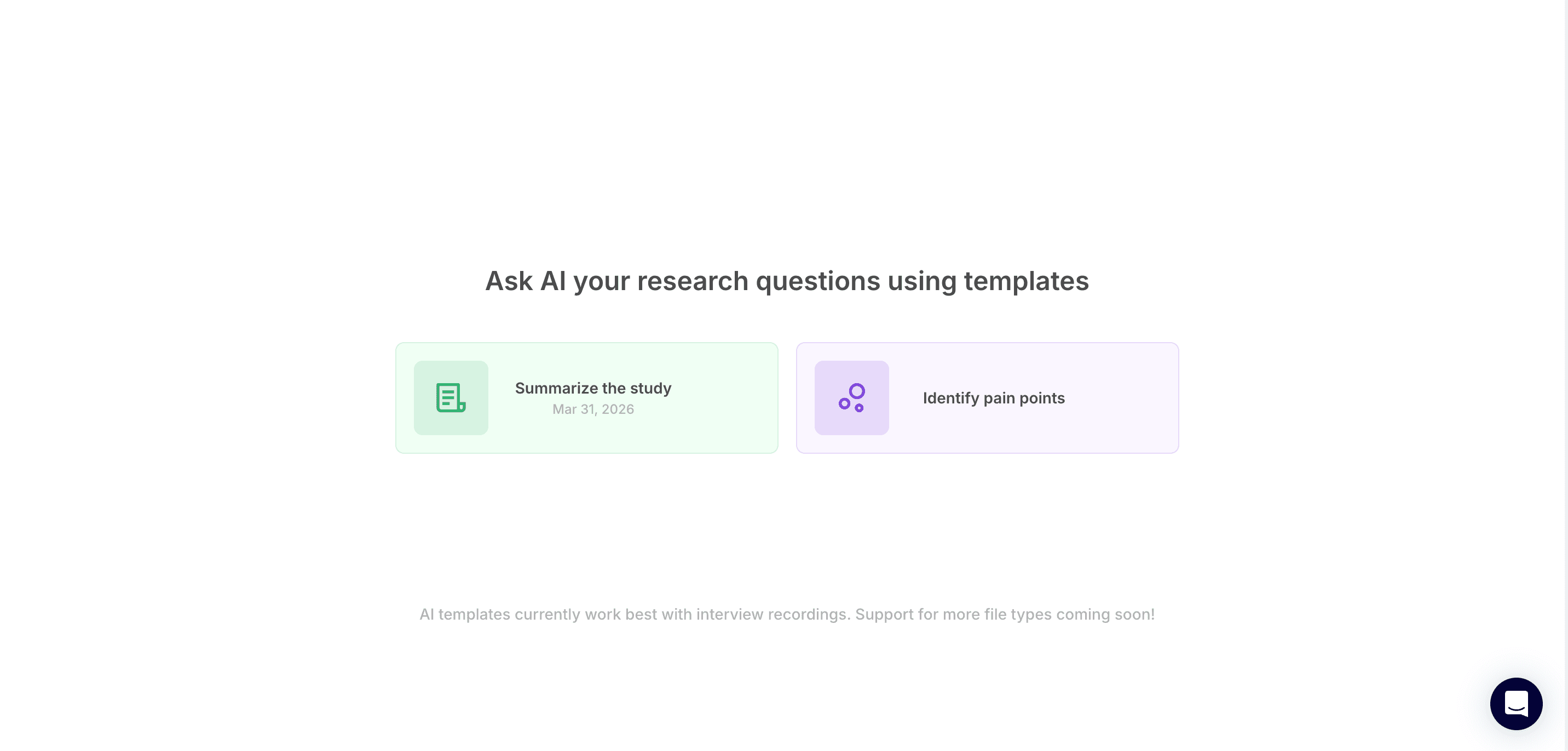
The initial touchpoint for this feature on the UI was an option for researchers to pick a template. We intentionally restricted users here because that would allow us to create a starting point for them. So we had two templates the user could pick — either "Summarize the study" or "Identify pain points".
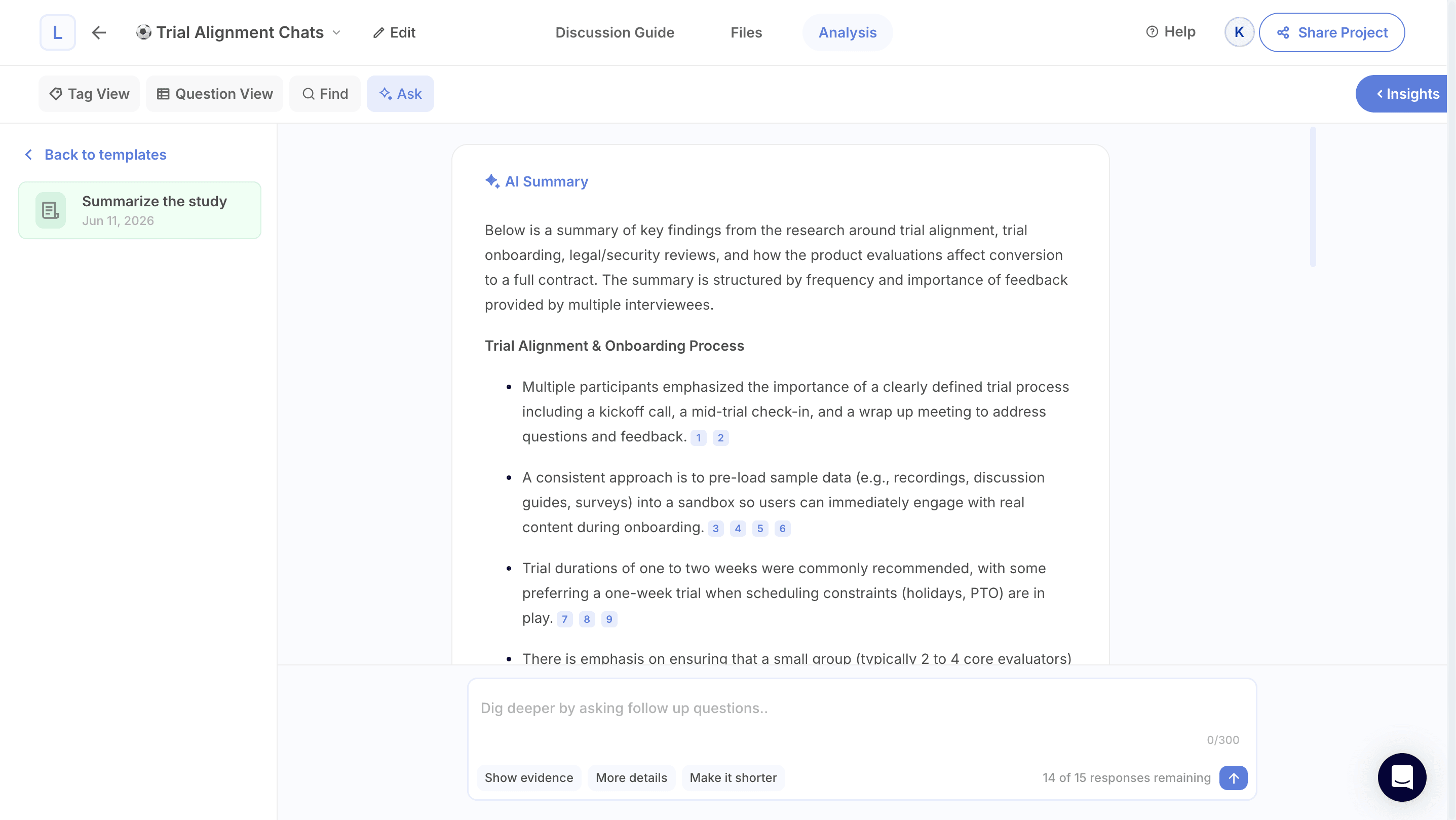
These templates build a report based on the transcripts the system reads. The researcher can then ask follow-up questions to that report, or even anything else in that project as naturally as they'd type into ChatGPT.
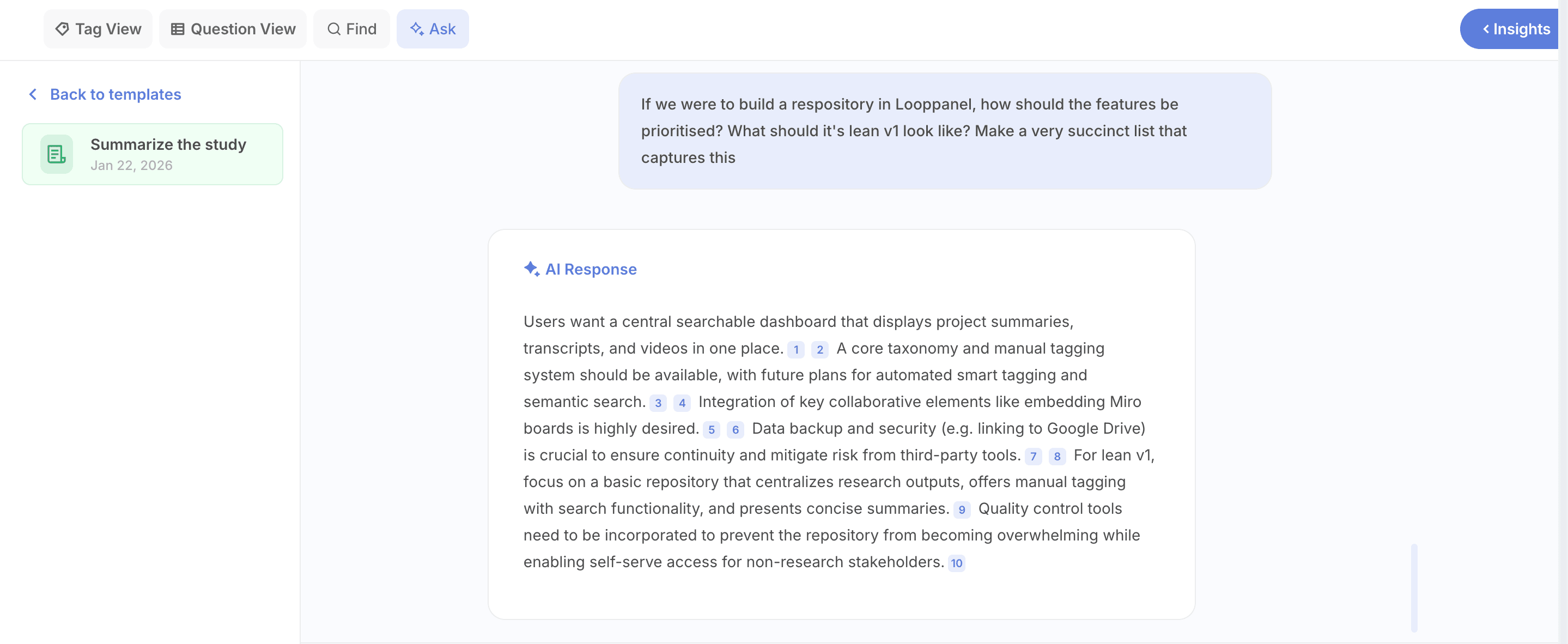
As a former engineer myself, I took a bold decision to not get into streaming or infinitely rolling chat history.
One of the harder product judgment calls was resisting the temptation to build a full chat-like experience just because "that's how AI chat works." A truly smooth, streaming, infinite-scroll chat is a significant engineering project. It also wasn't what users needed first. What they needed was to trust the output before they'd invest time chatting with it.
The Architecture: Simpler Than You'd Expect
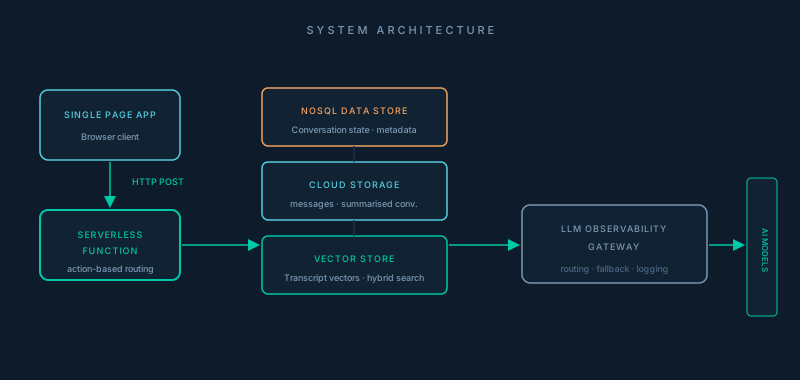
The brain of our AI chat feature was a single HTTP nanoservice. No WebSockets, no Server-Sent Events, no streaming at all. Every operation was dispatched via the same nanoservice. The decision to skip WebSockets is worth calling out explicitly. It made the system dramatically simpler to reason about, deploy, and debug. We knew the trade-off was latency and UX. Much aligned with my intuition, three months later, we saw how much customers trusted the output quality — and so the lack of a real-time streaming chat experience took a backseat in terms of UX for them.
Indexing Transcripts into Vector Store
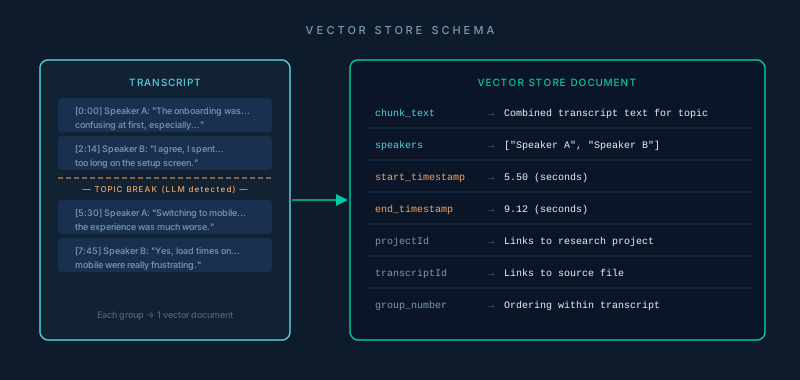
We employed a vector database and an advanced language model to perform reranking for hybrid search. This formed the base of this system.
Transcripts weren't stored as monolithic blobs. Before indexing, each transcript is segmented into topically coherent groups. We utilised an LLM with structured outputs to identify natural topic breaks — like moments where the conversation shifts from one theme to another. Each group becomes one vector document, carrying:
Our first trigger to index data is when the user first chooses a template — this indicates to our system that for this project, AI Chat hasn't been used before. Minor triggers were when any new subsequent transcripts were uploaded to the project.
The backend function would first check based on the constraints: Is this project eligible for AI chat? It would then create a conversation document in our database and generate the first AI response based on the template the user picked.
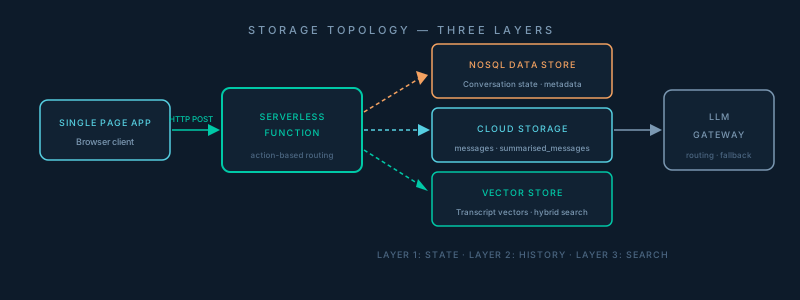
The storage topology is three-layered. Our database holds conversation metadata — state flags, message counts, status. The full message, encrypted, including the complete transcript context and all AI responses, lives in Cloud Storage as JSON blobs. Transcript data for semantic search lives in a vector database.
Follow-Ups and Conversation History
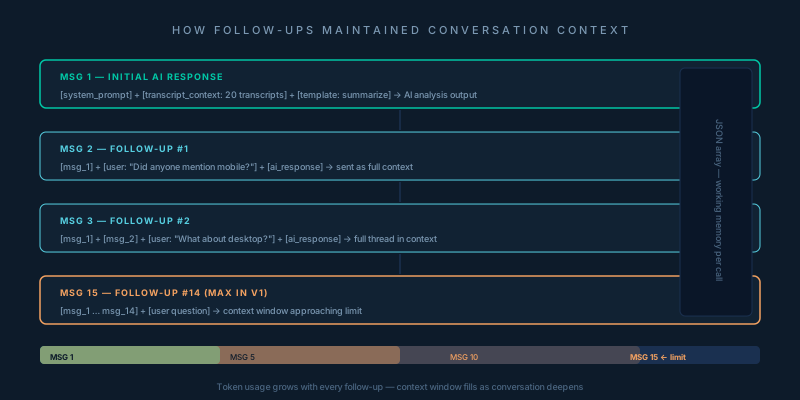
Our V1 utilised a single model approach where all the output was generated by one AI model that we had cherry-picked based on speed, reasoning capabilities, cost, and memory. Every time a user sent a follow-up, the entire conversation up to that point went back to the model as context — the full thread, not just the latest message. This is what lets the model give coherent answers that are built on earlier exchanges rather than treating each question in isolation.
We maintained a JSON array for every message: each user question and each AI response, in order. That array was the working memory for the model on every subsequent call.
We capped conversations at 15 total messages — the initial output for the AI chat plus 14 additional follow-ups. The constraint was real: with 20 transcripts worth of context already in the window, plus a growing conversation history, we knew from token estimation that the model would hit its context limit around that mark. For the beta, we named the limit on the UI clearly, and solved it cleanly in a later iteration.
Releasing V1
Within two weeks, our beta was live. Ten customers tested AI Chat thoroughly — and the response was unlike anything we'd seen before. Users weren't just satisfied, they were having fun.
The one signal that mattered the most was behaviour: customers had already started using AI Chat on projects outside the beta. Completely unprompted and unexpected. That told us everything.
That behavioural signal became the brief for V2. Turns out all that initial de-prioritisation was crucial after all, since we had so many answers in mere two weeks.
The First Real Problem: Trust
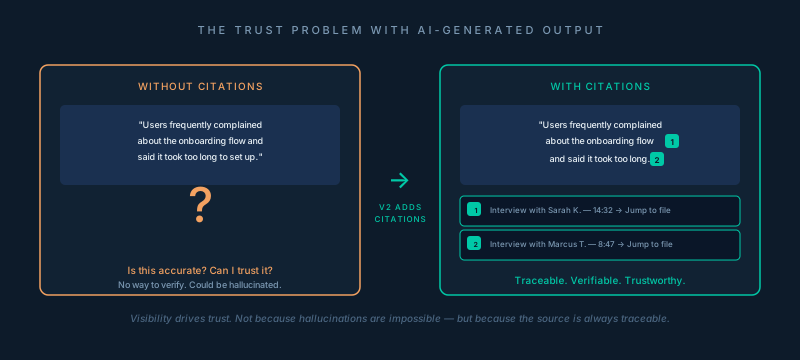
Anyone who has shipped LLM-powered features before knows hallucinations can be a deal breaker. It's not a fringe concern — when users rely on the output of AI-generated content, especially in the domain of professional research where a bad insight can translate to a misdirected product decision, we had to solve the trust issue quickly.
Enter citations — the second major thing we built after the initial beta.
AI Chat V2 with Citations
Ever used Perplexity to generate a report based on a search query? For each response, it gives you the source of truth — called a citation — so you know what it's using to generate that report for you. You hover over each citation and see the source and it immediately gives you confidence. Not because you know AI did not hallucinate, but because you can trace where the output came from. Visibility drives trust when reviewing AI output.
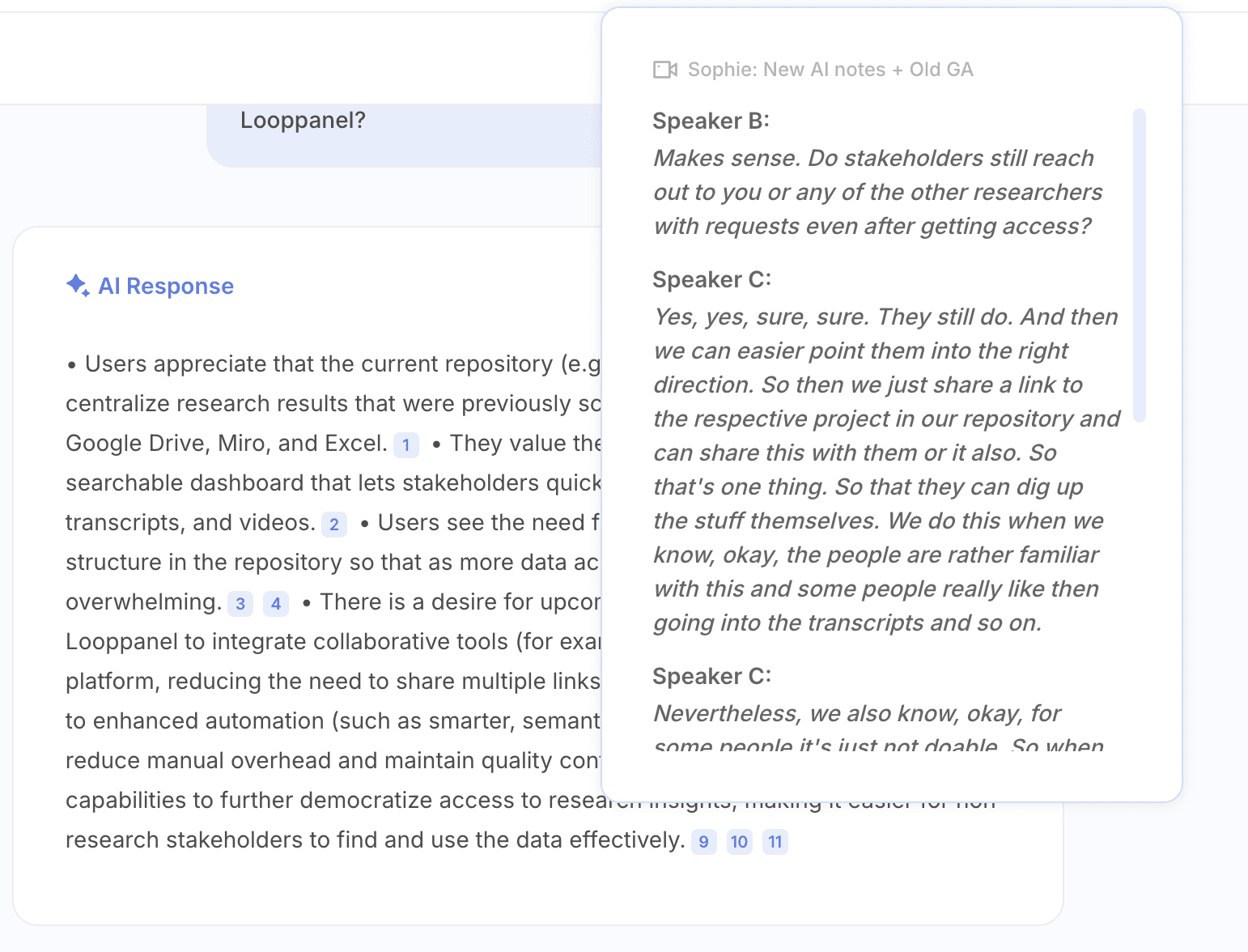
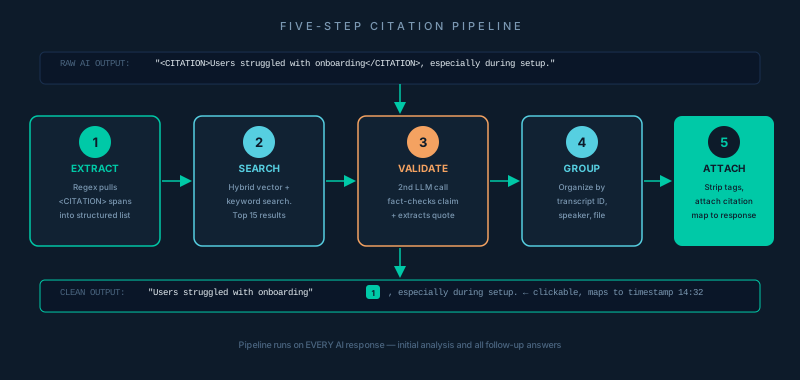
We instruct the AI (through the system prompt for both templates) to wrap every factual claim derived from transcript data inside a custom tag. Citations weren't just limited to the initial output of the template. They were also there when you would ask a follow-up question or continue that chat conversation. Every response would have citations mapping back to a transcript chunk and in turn, mapping back to an exact moment in time in that research interview.
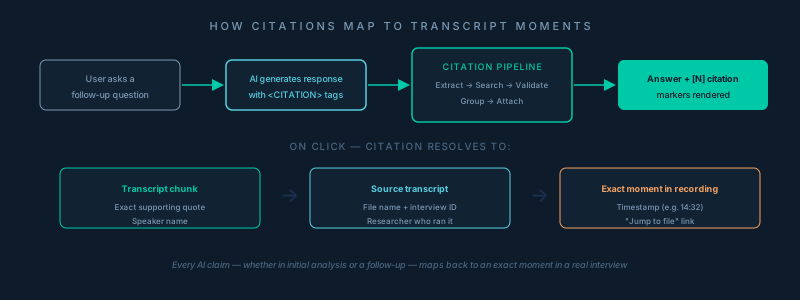
The raw model output with citations looked like this:
# The model wraps claims in <CUSTOM_TAG> tags
"<CUSTOM_TAG>Several users reported frustration with
the onboarding flow</CUSTOM_TAG>, particularly around
the initial setup screen."
A five-step pipeline processes those tags before any response reaches the user:
-
Extract — Regex pulls all strings enclosed in the tag (e.g.
<TAG>claim</TAG>) into a structured list of objects. -
Search — Each extracted claim is semantically searched against the vector data store index. Hybrid search (vector + keyword) with an advanced language model that performs reranking to return the top 15 most relevant transcript chunks per claim.
-
Validate — A second LLM call performs fact-checking for each claim against its search results, identifying which chunks actually support the claim and extracting an exact supporting quote.
-
Group — Validated citations are organized by source identifier, so each piece of evidence knows which file and which speaker it came from.
-
Attach — The
<CUSTOM_TAG>tags are stripped from the response and replaced with a citation map. The frontend renders these as clickable [N] numbers that open a dropdown with the source quote and a "Jump to file" link that navigates to that exact timestamp in the recording.
Model Cascading with Larger Context Windows
A couple of months later, we wanted to put AI Chat out of beta. It was available for every new signup and was also one of those magic features our potential customers loved during the trial. We wanted to address the problem around limited context windows which led to two major constraints:
- Projects with more than 20 transcripts did not have AI Chat
- Users could only do 14 follow-ups, so an AI Chat conversation was limited to only 15 messages
Context windows with LLMs especially in chat interfaces are a common problem. However, the easiest way to solve this enough to put the release out of beta was adding a model cascading layer.
Multi-Model Approach
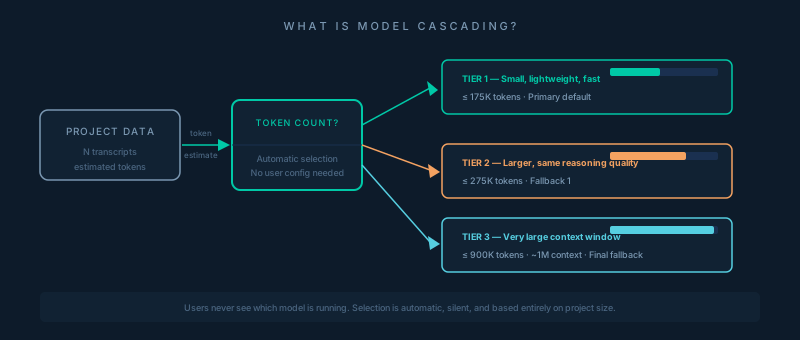
One of the biggest wins from our incremental approach was the model cascade. A three-tier fallback system that automatically selects the best model based on how large the project data is. This model cascade system by itself solved the context window problem to a large extent.
When a project's transcript corpus is estimated to fit inside 175K tokens, we use Model 1. Larger projects fall through to Model 2, and larger still to Model 3 with its approximately ≥1M-token context window. This is what lets us expand from 20 transcripts to 50, and then up to 60 by simply using models with bigger limits.
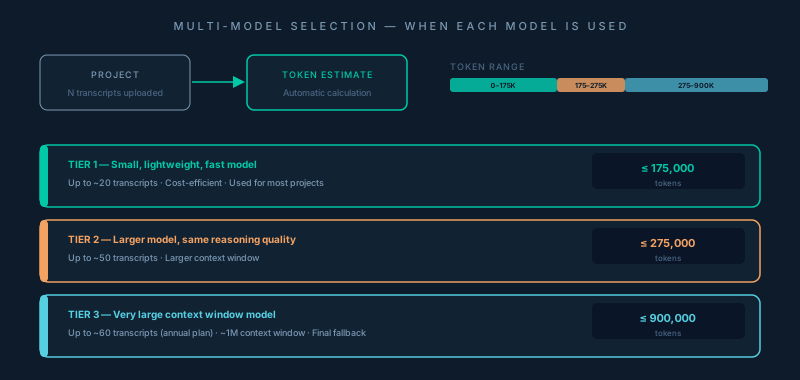
An important consideration before we added the model cascade was the difference in reasoning capabilities. Since there wasn't any discernible difference in the reasoning capabilities, this approach worked well for us. Model 3 required specific instructions to meet the output format that Model 1 and 2 delivered, so its prompt had to be tweaked accordingly.
This was a fun one-week release that I independently led — right from reviewing these models, to adding them in our system, deploying them, testing them, and finally releasing this update and putting AI Chat out of beta. It was a testament of how much I enjoyed thinking in systems and being hands-on with execution as a PM.
Releasing V3
AI Chat came out of beta. Available for any project with audio or video transcripts, the 20-transcript ceiling was gone. Standard workspaces could now run AI Chat on up to 50 transcripts, and annual plan customers up to 60. The model cascade handled the rest silently: users never had to think about which model was running. They just got answers.
It was a quiet release in terms of surface area — no new UI, no new templates. But the unlock was significant. Projects that had previously been too large to use AI Chat at all could now use it in full.
Conversation Summarisation (V4)
The next and final iteration was around solving the context window problem properly. We no longer wanted to cap it at a higher number, but completely eliminate this ceiling altogether — at least practically.
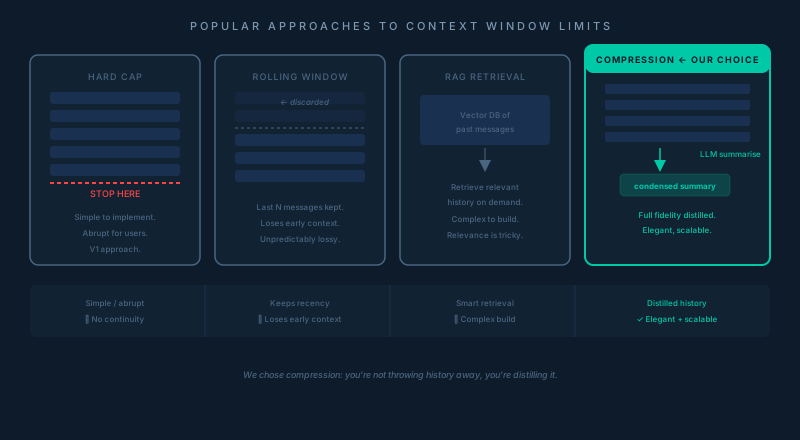
I did a quick competitive sweep and looked at how ChatGPT and Claude handled long-running conversations. Two approaches stood out: truncating history to a rolling window, or compressing it. Truncation was simpler but lossy in an unpredictable way — you're arbitrarily discarding older messages without knowing which ones still matter to the current thread. Compression was more elegant. You're not throwing history away, you're distilling it.
How It Works Under the Hood
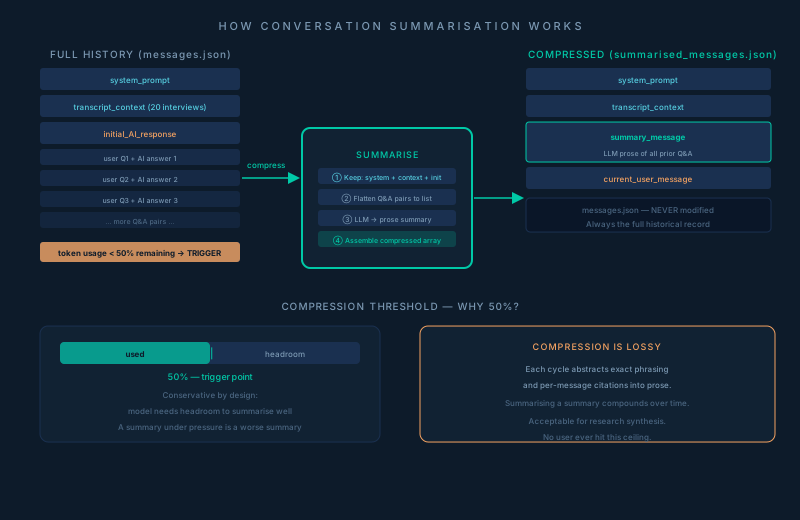
Every follow-up message carries the full weight of everything that came before it: the system prompt, all the transcript context loaded at the start, and every prior Q&A pair in the thread. As that stack grows, it steadily eats into the model's context window. The system monitors this continuously — token usage is estimated on the full JSON-stringified conversation array and measured against the model's limit. That reference point stays fixed regardless of which model tier is actually running the conversation. Once remaining capacity drops below 50%, compression triggers automatically.
Summarisation then does the following: it extracts the first three messages — system prompt, transcript context, and the initial AI analysis — and holds those untouched, since they're the foundation everything else depends on. It then iterates through all subsequent Q&A pairs, structures them into a clean [{question, answer}] list, and passes the whole thing back to the model with one instruction: produce a single condensed prose summary of everything discussed. That summary becomes one message in the new compressed array, slotted between the transcript context and the current user question:
[system_prompt, transcript_context, summary_message, current_user_message]
This compressed array is stored separately in Cloud Storage. Critically, the original conversation history is also maintained, updated, and never touched. It remains the complete historical record of the conversation. From that point forward, every subsequent message loads the summarised version as its working context, not the full history.
The PM Decision Embedded in This
One call worth flagging: the 50% threshold is deliberately conservative. We could have waited until 80% or 90% of the context window was consumed before compressing — that would have preserved more verbatim history for longer. But compressing at 50% gave the model enough headroom to generate a thorough summary without itself running into token constraints. A summary generated under pressure is a worse summary. We'd rather compress a little early than compress poorly.
The Trade-Off
Compression is lossy by design. Specific phrasing, individual citations from mid-conversation responses, the granular back-and-forth — all of that gets abstracted into prose. The conversation remembers what was covered, not what was said. Each subsequent compression cycle compounds this slightly — you're eventually summarising a summary.
Although our feedback calls and analytics indicated that no user ever pushed a conversation far enough to feel that degradation. For research synthesis, it's an acceptable trade-off.
The final version of AI Chat shipped in two weeks with unlimited conversation history, which meant no follow-up cap. A single conversation could run to 20 messages, 30, or even 50 using the compression layer.
What We Learned from Shipping Lean
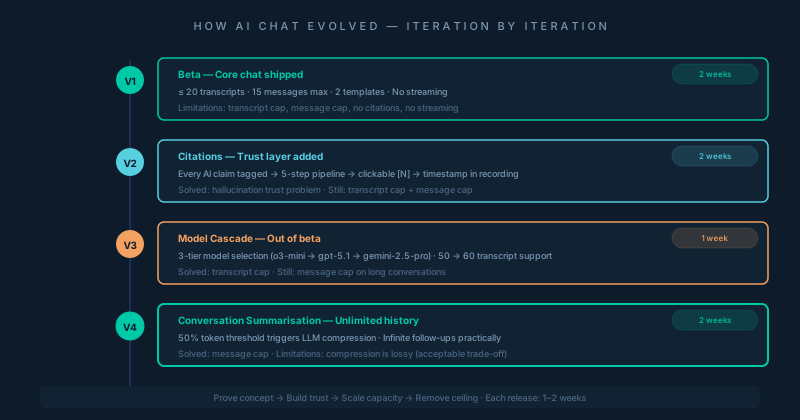
Looking back, the most important thing we got right was the sequencing. Not building everything at once, but building in the right order: prove the concept first, build trust second, scale third.
Citations came before infinite chat history because trust was the prerequisite for engagement. Researchers had to believe the summaries were grounded in their actual data before they'd invest effort in a follow-up conversation. A hallucinated insight in a user research report can genuinely damage a product decision. We couldn't afford to make them wonder whether the AI was making things up.
Model-agnosticism came later, but it unlocked a step-change in capacity. Moving from 20 to 50+ transcripts changed who could use the feature — from teams with focused studies to teams with deep longitudinal research archives. It also opened avenues to expand AI Chat to other data sources like NPS surveys, unstructured research notes, and market research reports.
The things we didn't build — streaming, real-time updates, multi-user collaboration within a conversation — were all real trade-offs, not oversights. They helped us balance the speed and value proposition for this feature.
Final Thoughts
Building AI Chat was a bet that paid off. Not because we built it perfectly but because we built the right things in the right order, shipped something real users could react to, and used their reactions to guide each subsequent iteration.
The technical underpinnings are genuinely interesting: the citation pipeline, the conversation compression approach, the three-tier model cascade. But they're details in service of a product judgment. The real bet was on whether researchers would trust an AI to help them make sense of their data. The answer, emphatically, was yes.
If you're a PM sitting on a similar intuition right now — a feature that feels right but where you don't have data — my advice is: build the version that proves the hypothesis, not the version that assumes it's already proven. Ship something honest about its constraints. The sales call moment will find you.